




















New Sage 100 Enhancement Adds Tariffs and Additional Pricing to Sales Orders and Invoices

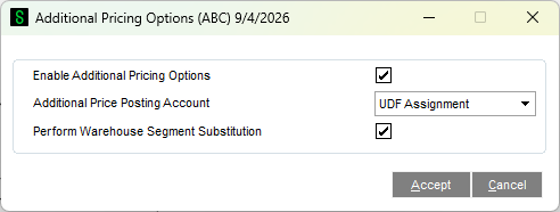
A new SOAP Additional Pricing Options menu item is added to the S/O Setup menu, where you enable the enhancement and choose how Additional Prices should post to General Ledger during the Sales Journal Update: using the Item’s Inventory Revenue account, a new Product Line account, or a separate account assigned to each individual charge. You can also turn on Warehouse Segment Substitution for these postings.
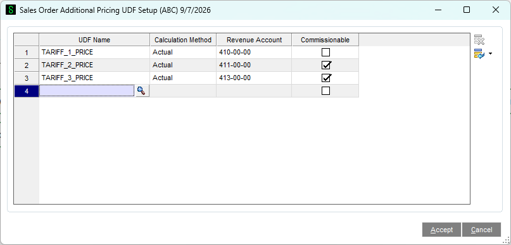
Each Additional Price is defined as a numeric User-Defined Field (UDF) in Custom Office, which can flow from the Item Master all the way through Sales Order Detail, Invoice Detail, and Invoice History Detail. Once the UDFs are created, the Sales Order Additional Pricing UDF Setup menu item lets you enter each Tariff or Additional Price, choose whether it calculates as an Actual amount or a Percentage, assign its G/L Revenue Account, and flag whether it’s Commissionable.
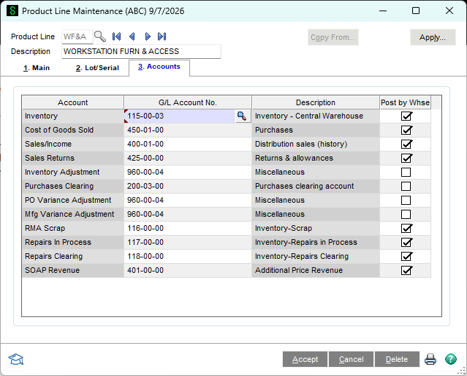
If you choose to post Additional Prices by Product Line, a new SOAP Revenue account field is added to Product Line Maintenance, so each Product Line can direct its additional charges to its own G/L account.
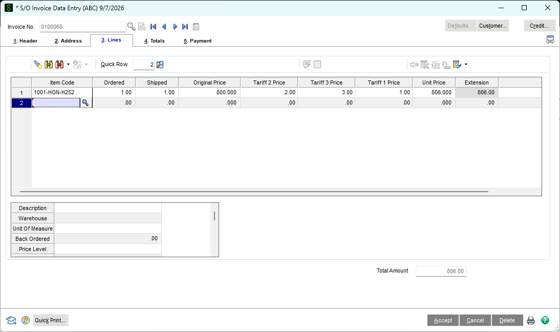
Once the UDFs are added to the Lines grid, every Additional Price defined in Item Maintenance flows automatically into Sales Order Entry and Invoice Entry. A new Original Price field captures the standard Sage 100 calculated Unit Price before any charges are applied, and each Tariff or Additional Price is then added on top of it — as a flat Actual amount, or as a Percentage of the Original Price — to arrive at the final Unit Price.
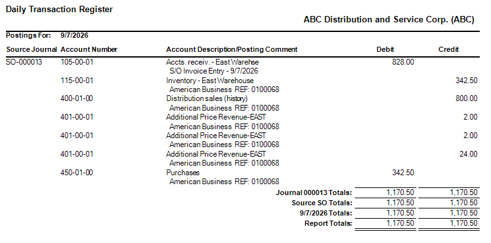
At Sales Journal Update, the Original Price and each Additional Price post separately to General Ledger based on the option chosen in Additional Pricing Options — whether that’s the Item’s own revenue account, the Product Line’s SOAP Revenue account, or the account assigned to that specific charge in UDF Setup. Any charge flagged as Commissionable is added into the Commissionable Amount for accurate Salesperson Commission reporting, and the Original Price and all Additional Price UDFs post to A/R Invoice History for full traceability.