





















New IN-SYNCH 2026 Release Enables Management by Exception
New IN-SYNCH 2026 Release Enables Management by Exception
It takes a lot of time and dedication to develop a reliable, powerful software solution like IN-SYNCH. It takes even more time and dedication to continue innovating after your product has gone to market! Although IN-SYNCH has been around for thirty years, our development team has never stopped dreaming up—and then implementing!—new features that will better serve our customers. This year is no different: our 2026 release comes with amazing new features that will significantly improve IN-SYNCH’s UI as well as automate key tasks like error reporting.
Our goal for this release was to enable management by exception: making the software run smoothly and automatically, only requiring input when something goes wrong.
Your New Windows Service
Some of the biggest improvements in this release are based on IN-SYNCH’s new ability to be run as a Windows service. This ability allows us to enable management by exception in the following ways:
Automatic restart:
IN-SYNCH now automatically starts in the background if your system has to reboot for updates—no need for a manager to come start the system manually.
Distributed management:
Multiple people/computers can access IN-SYNCH, so no one needs to switch computers to interact with the software. This enables IN-SYNCH to run according to more of a centralized client server architecture, where each object is accessed remotely by the UI.
Role security:
IN-SYNCH now has a “view-only” role option, allowing certain users to view the tasks that IN-SYNCH is running without being able to change those tasks. For example, this role is a great option for an executive who wants to keep an eye on things or an accounts receivable employee who wants to be able to see which invoices have come in.
Status monitor:
Users can choose to have a small status monitor window open on their computers. By showing a brief summary of what IN-SYNCH is doing and/or any errors that occur, the status monitor enables real-time oversight without active intervention.
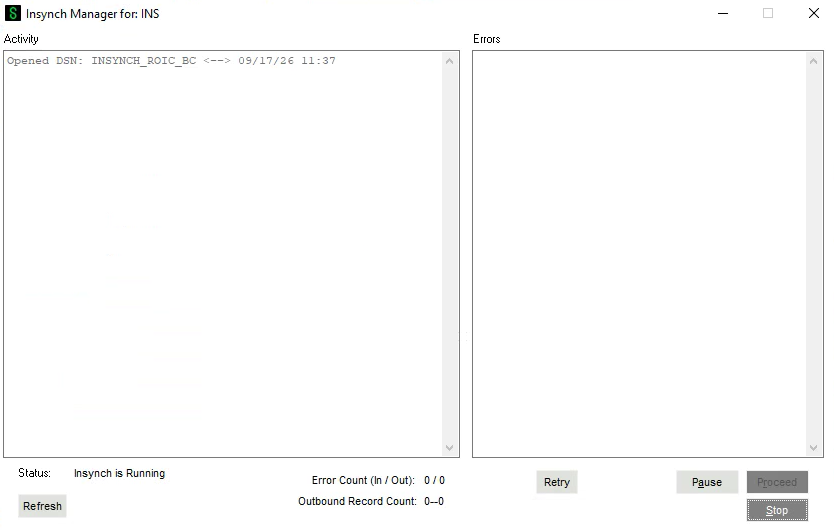
For example, the status monitor shows a count of inbound and outbound records for the past 24 hours. Having those numbers available at a glance allows users to quickly identify an issue that drops those numbers significantly.
All these features will provide easier collaboration and greater insight into the software’s functioning without requiring more work from IN-SYNCH users.
The Transformed Manager UI
Many of the best features of this new IN-SYNCH release have to do with the Manager UI. In response to customer feedback, the IN-SYNCH team has made several changes to allow for management by exception within the Manager UI.

More useful status field:
In contrast to the previous status field, which just displayed “starting” while IN-SYNCH was in use, the new status field shows whether IN-SYNCH is running, paused, or disconnected.
Reverse chronological activity windows:
In response to customer feedback, the activity windows in the Manager UI now display activity in reverse chronological order, with the newest incoming activity at the top. This gives users the most important information they need right away instead of making them scroll.
Pause improvements:
Previously, the pause button in IN-SYNCH would stop everything it was doing and clear all work. Now, the Manager UI has both a pause button and a stop button. The pause button won’t cause IN-SYNCH to clear everything in its queue, but instead take a break before coming back to the same tasks when the pause ends.
Scheduled daily pause:
Users can now schedule a daily pause for IN-SYNCH. This feature is especially valuable for companies that run scheduled daily backups, as the pause does not lock any IN-SYNCH or Sage 100 files and IN-SYNCH will start right where it left off once the backup is complete.
These changes should allow for a much smoother user experience and will help IN-SYNCH adapt to your specific company requirements.
Error Handling
The single biggest update the team has made to IN-SYNCH is how it handles errors. This release completely transforms how IN-SYNCH responds to an error: instead of stopping everything when something goes wrong, the software now takes a note of the error but continues with all its other tasks that are not affected by that error. This change takes a huge burden off of users and allows for true management by exception.
The first step towards this transformation is that in most cases, IN-SYNCH is now able to identify exactly what error occurred and on which record it occurred. It now provides SQL codes for errors and will show the customer number or order number that has failed, for example. Users will always get the type of record being written, the key of that record, the field that failed, the value of the field it was trying to write, and the error message that was reported from Sage.
Now that IN-SYNCH can identify specific errors on specific records, it can isolate those errors and work around them. Let’s take an example: in old versions of IN-SYNCH, if everybody’s gone home for the night and the software hits an error at 6 p.m., nothing will happen until somebody comes in in the morning and is able to get it going again. It’ll just keep hitting that error over and over again without making any progress. Now, once IN-SYNCH knows that a record has an error, it bypasses it and goes on and does everything else.
IN-SYNCH doesn’t just ignore the error, though: it will come back on a regular basis—independent of its other tasks—and retry that particular task. For example, let’s imagine a company that pushes lots of prices overnight. One price in the middle of the list causes an error. Previously, IN-SYNCH would make it to that point, and then it would just stop and wait until an employee could fix the error. Now it will hit the error, it will report the error, and then it will keep going. About 10 seconds later, it will come back and try it again, just in case it was a quick little problem. And then it will wait twice that long before it tries again. It keeps retrying the task, doubling the waiting period each time, until it is only retrying daily. It will keep trying once a day until something gets fixed. And every time it tries, it goes back and rereads the source data from Sage 100. And it will show the error again in the log every time it retries.
There’s also now a counter at the bottom of the Manager UI showing how many errors are in that retry queue, both inbound and outbound. Users can quickly glance at that to get an idea of how many errors need to be fixed. There is even a button to allow them to immediately retry everything! For example, if IN-SYNCH collected a whole bunch of errors that all had the same root cause which was just fixed, there’s no need to wait for the automatic retry. The retry button will bump those retries to the top of the queue and retry them all right away.
Smoother Processes, Smoother Management
The system should just keep running. That’s the goal of this release: for IN-SYNCH to be as hands-off as possible so users only have to manage the exceptions and (carefully documented) errors. Our team is so excited to see how these features make a difference to our customers. If you have questions for us—or would like to discuss implementing IN-SYNCH for the first time—please contact us. We’d love to talk!