

















Tariffs from the Dock to the Invoice: Three DSD Enhancements That Put Sage 100 in Control of Tariff Costs and Pricing
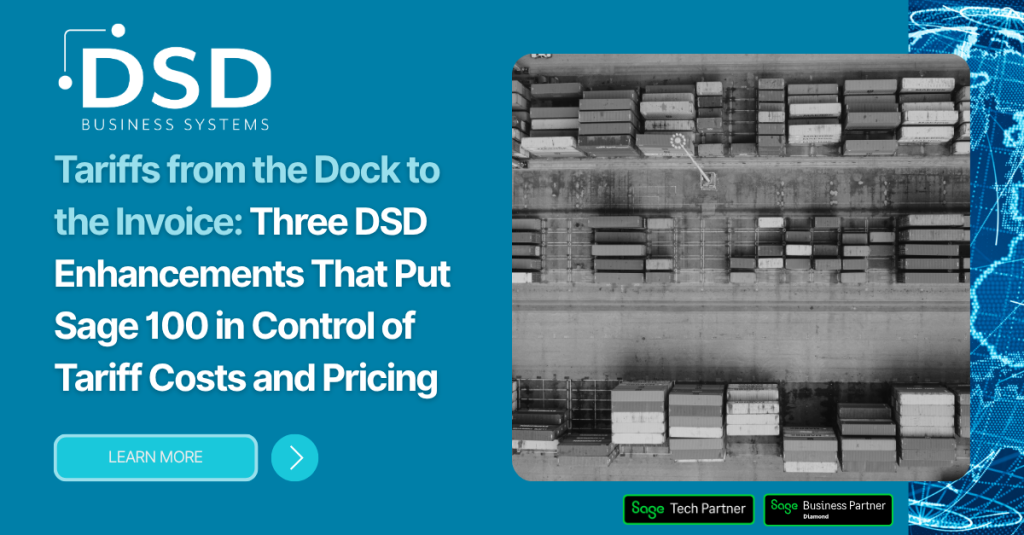
Tariffs from the Dock to the Invoice Three DSD Enhancements That Put Sage 100 in Control of Tariff Costs and Pricing

With recent tariff implementations and rapidly shifting import regulations, businesses are feeling the pressure on both sides of the ledger. Tariffs drive up what you pay for goods coming in, and you need a clear, trackable way to pass those costs on to customers going out.

DSD Business Systems offers three Sage 100 enhancements that work together to handle tariffs across the entire lifecycle of your inventory:

  • POLC Purchase Order Advanced Landed Cost – Define Item-specific tariffs, duties, and fees as landed costs when goods are received on a Purchase Order.
  • IMLC Inventory Transaction Entry Landed Cost – applies landed costs to Inventory Transaction Transfers, Receipts, and Adjustments, for goods that don’t come in through Purchase Orders.
  • SOAP S/O Additional Prices / Tariffs – adds tariffs, surcharges, and other additional pricing to Sales Orders and Invoices, tracked separately from the item’s original price.

Together, POLC and IMLC make sure every tariff is reflected accurately in your inventory cost, and SOAP makes sure those tariffs are recovered transparently on what you sell, all the way through to General Ledger and Commission reporting.

Part 1: Capturing Tariffs in Your Inventory Cost

Accurate landed cost is the foundation of tariff management. If tariffs, duties, and freight aren’t captured in your item cost, your margins, pricing decisions, and inventory valuation are all off. Organizations that once relied on manual processes are turning to POLC and IMLC to make sure every surcharge, tariff, duty, and fee is captured with precision.

POLC Purchase Order Advanced Landed Cost

POLC transforms the Receipt of Goods workflow into an intelligent, automated process, saving time, improving accuracy, and providing clearer financial visibility at a time when supply chain costs have never been more unpredictable.

A new “Default” checkbox in Landed Cost Type Maintenance lets you preselect which landed cost types automatically populate in Landed Cost Entry during Receipt of Goods. With tariffs and fees fluctuating, these defaults ensure consistent application across all receipts.

The new “Percent to Allocate” field lets Sage 100 automatically calculate landed costs using percentage-based allocations, which is ideal for duty rates or tariff percentages tied to product categories or countries of origin.

POLC supports automatic landed cost assignment at the line-item level using unlimited Landed Cost Types, Amount or Percentage allocation methods, and a Custom Office UDFs that flow from CI_Item to PO_PurchaseOrderDetail to PO_ReceiptDetail. This is especially valuable when tariffs apply differently to each item.

For companies importing goods globally, where tariffs often vary by region, POLC works seamlessly with DSD Multi-Currency for consistent, accurate costing across international transactions.
Easy setup: Activate POLC in Purchase Order Setup → POLC Setup Options by checking “Enable.” From there, select up to 10 Landed Cost Types for automatic line-item assignment, choose the Allocation Method (Amount or Percentage), and select a Landed Cost Amount UDF for item-level cost mapping.
In Receipt of Goods Entry: default Landed Cost Types populate instantly, line-item rules apply additional types, percentage-based tariffs and duties calculate automatically, values can be overridden for exceptions, and Recalc keeps totals accurate when tariff amounts change.
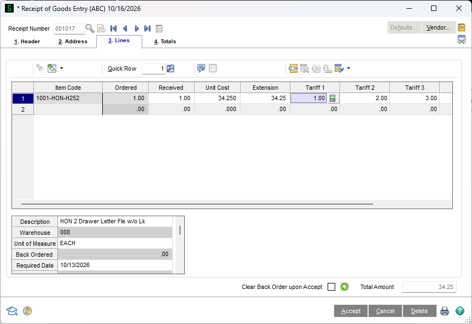
Tariffs DSD Multi Currency Compatible

IMLC Inventory Transaction Entry Landed Cost

Not every tariffed item arrives through a Purchase Order. IMLC adds landed cost tracking directly within Inventory Transaction Transfers, Receipts n and Adjustments, so your inventory values fully reflect freight, duties, tariffs, and other inbound expenses no matter how the goods were brought in.

If you want to do an Inventory Receipt in I/M Transaction Entry instead of Purchase Order Receipts, you can do that with IMLC. The Landed Cost (Tariff) amounts are treated as Allocated Cost, similar to Purchase Order Receipts.

Inventory Transfers to another warehouse can have a Landed Cost assigned to increase the item cost as it goes into the destination warehouse.

Inventory Adjustments to an item cost are common when you receive and Item into inventory without a Landed Cost, and you then need to adjust the cost after-the fact to have the Landed Cost as an Allocated Cost.

Each transaction line includes an Allocated Landed Cost checkbox, giving you control over which items should absorb the additional cost.

The Transaction Register shows allocated cost amounts for each item, new unit costs after landed cost is applied, and full landed cost totals for each transaction. These values post during the Transaction Register update, and the Cost Detail tab in Inventory Inquiry reflects both the Item Cost and the Allocated Cost.
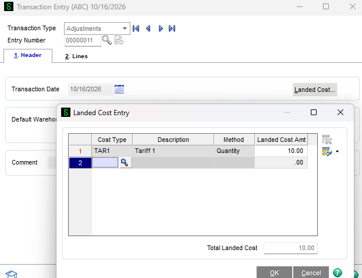
Tariffs Enhanced Transaction Register Details

Part 2: Recovering Tariffs on Sales Orders and Invoices

Once tariffs are built into your cost, the next challenge is passing them on to customers in a way that’s clear, trackable, and reportable. Standard Sage 100 has a few constraints here:

  • Pricing produces a single calculated Unit Price per line, with no built-in way to layer separate, trackable charges on top of it.
  • Extra charges typically have to be keyed in manually or blended into the Unit Price, so the item’s original price is lost and can’t be reported on its own.
  • There is no standard way to post these charges to G/L accounts other than the item’s base revenue account, or to decide whether they count toward salesperson commission.
  • Sales Order and Invoice forms have no place to show the original price separately from additional charges, so customers get no transparent breakdown.
SOAP S/O Additional Prices / Tariffs

SOAP lets you define unlimited additional item charges, as either a flat Amount or a Percentage of the item’s price, and have them automatically calculate and flow through Sales Order Entry, Invoice Entry, and Invoice History. Tariffs, freight surcharges, environmental fees, or any other add-on charge are tracked separately from the item’s original price, all the way through to General Ledger and Commission reporting.

A new SOAP Additional Pricing Options menu item on the S/O Setup menu lets you choose how Additional Prices post during Sales Journal Update: to the Item’s Inventory Revenue account, a new Product Line account, or a separate account assigned to each individual charge. Warehouse Segment Substitution is also supported.
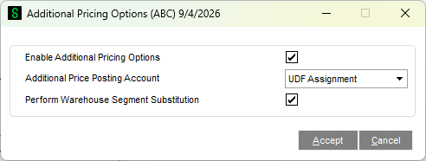
Tariffs Flexible GL Posting Options

Each Additional Price is a numeric User-Defined Field that flows from the Item Master through Sales Order Detail, Invoice Detail, and Invoice History Detail. In Sales Order Additional Pricing UDF Setup, you choose whether each charge calculates as an Actual amount or a Percentage, assign its G/L Revenue Account, and flag whether it’s Commissionable. When posting by Product Line, a new SOAP Revenue account field is added to Product Line Maintenance.

In Sales Order Entry and Invoice Entry, a new Original Price field captures the standard Sage 100 Unit Price before any charges are applied. Each Tariff or Additional Price is then added on top, as a flat amount or a percentage of the Original Price, to arrive at the final Unit Price.
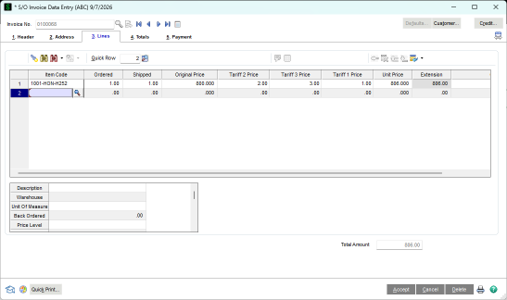
Tariffs Original Price Preserved

Tariffs and Additional Prices in S/O Invoice Data Entry

At Sales Journal Update, the Original Price and each Additional Price post separately to General Ledger. Charges flagged as Commissionable are added to the Commissionable Amount for accurate Salesperson Commission reporting, and the Original Price and all Additional Price UDFs post to A/R Invoice History for full traceability.

Better Together: A Complete Tariff Strategy for Sage 100

Each enhancement solves a specific problem, but together they give you end-to-end control of tariffs in Sage 100:

  • Receive with POLC: tariffs, duties, and fees are automatically calculated and allocated to items during Receipt of Goods.
  • Adjust and transfer with IMLC: landed costs are applied to inventory transfers and receipts outside of Purchase Orders.
  • Sell with SOAP: tariffs and surcharges are added to Sales Orders and Invoices as separate, trackable charges, posted to the right G/L accounts and included in commissions when appropriate.

The result is accurate inventory costing, protected margins, transparent customer pricing, and clear reporting, even as tariff rules continue to shift.

Learn More

For more information on these DSD Enhancements for Sage 100, visit the product pages:

Picture of Jon Reiter

Jon Reiter

General Manager, Sage 100 Enhancements

Categories:
Enhancements Sage 100
Tags:
Cloud ERPDocument ManagementGeneral Business

Congratulations! You’re registered to join us.

Acumatica Lunch and Learn Irvine, CA
We’re so excited to show you the power of Acumatica!

Should you have any immediate questions or needs, please feel free to reach out to your event host: ktucker@dsdinc.com