Sage 100 2026: A Closer Look at New Features
In prior versions of Sage 100, specifically versions 2021-2025, you have the option of installing the 32-bit or 64-bit application. In this version, only the 64-bit is available. According to Sage, if you’re installing on a server with an earlier 32-bit version of Sage 100 2021–2025 installed, the 32-bit version will no longer work.
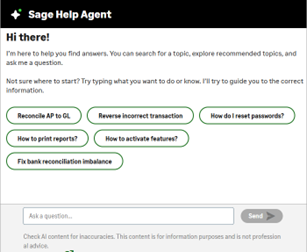
Use the new AI-powered Sage Help Agent to find answers to your Sage 100 questions. The Sage Help Agent button has been added to the Sage 100 Launcher’s Home tab to use the agent in your Desktop browser. Ask a question about what you want to do or know, and the agent will use AI to get you the nest answer. You can also access the agent on the Information Center page!
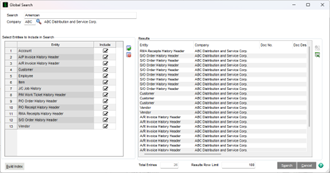
A Global Search button has been added to the Sage 100 Launcher’s Home tab to perform a global search in Sage 100 data. You can search by data files for specific fields, by Company or for all Companies.

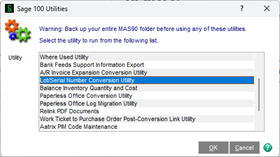
The lot/serial number field has expanded from 15 to 50 characters in length in the
Following modules: Accounts Receivable, Bill of Materials, Common Information,
Inventory Management, Mobility for Bar Code, Production Management, Purchase
Order, Return Merchandise Authorization, and Sales Order.
You have the option of zero-filling Serial Numbers to 50 characters, and you also have a utility that you can run from File / Run / *UTL to convert your existing numeric lot/serial numbers to the new length of 50 characters by inserting leading zeros.
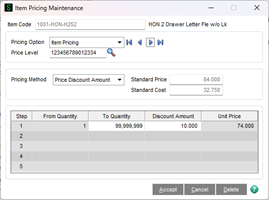
The Price Level field has been expanded from 1 to 15 characters in the following modules: Accounts Receivable, Customer Relationship Management, Inventory Management, eBusiness Manager, Job Cost, Return Merchandise Authorization, and Sales Order. This great feature allows for almost unlimited Price Levels that you can assign to customers.
The Sales Order Package Tracking Number field has been expanded from 30 to 40 characters to fit the longer tracking numbers used by shipping carriers and services, such as FedEx Ground and DHL eCommerce.
The Sales Order Package Tracking Number field has been expanded from 30 to 40 characters to fit the longer tracking numbers used by shipping carriers and services, such as FedEx Ground and DHL eCommerce.
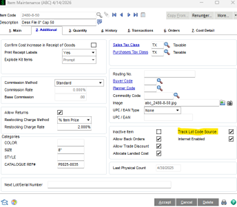

New options have been added that enable you to set additional requirements that determine which purchase orders sync from Sage 100 to Sage Supply Chain Intelligence:
- Use the Allow Sync for Sage Supply Chain Intelligence check box in Vendor Maintenance to determine if purchase orders for a specific vendor sync.
- Use the Sync to Sage Supply Chain Intelligence check box in Purchase Order Entry to determine if a specific purchase order syncs. This check box can only be viewed in Purchase Order History Inquiry.
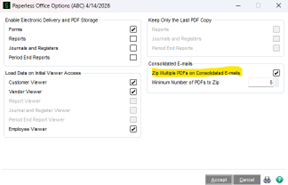
You can now consolidate multiple forms into one email for a specific customer or vendor and selected form. So, if you’re sending 10 invoices to a customer, then only one email with all 10 invoices will be sent instead of 10 individual emails.
You also have the flexibility to zip multiple forms into a single attachment on consolidated emails, and you can schedule the delivery of consolidated emails using Task Scheduler.
- Enhanced Password Validation and Security
- A ‘Maximum Hours Session Can be Inactive’ field has been added to improve security. The number of hours can be set for Sage 100 activity to be inactive before a user is automatically logged out.
- In Company Maintenance, the Payments tab has been renamed Integrations to describe the options available. The ‘Enable Sync for Sage Supply Chain Intelligence’ check box has been added.
- Audit Tracking for Roles and Users – A new Role Audit Report and User Audit Report are available on the Reports menu when audit tracking is enabled
- Form Printing Message (Subscription Users Only) – After forms are printed, a message appears to remind you to remove forms from the printer and replace with paper. If you don’t want this message to appear, you can turn it off in Role Maintenance.
- You can now print Sales Order Picking Sheets to PDF and email them to recipients in the warehouse. When Paperless Office is set up for forms, the Paperless button is available in Warehouse Code Maintenance. Click this button to define default email recipients for the selected warehouse in the new Paperless Office Delivery Options (Warehouse Code Maintenance) task.
- Scheduled Email Attachments – You can now set up and schedule additional attachments to email with a form.
- Improvements to Email Messages – In Electronic Delivery Message Maintenance, you now have additional selections at the Document field to create unique email messages for specific documents in a document group. For example, in the S/O Invoice document group, you can create specific messages for Credit Memos and Debit Memos.
- The calculation of Quantity Available has been improved to allow additional selections related to Production Management Work Tickets.
- Product Line Maintenance has improved to support a more efficient user workflow.
- You now have the option to suppress the Zero Cost Warning Message (enabled/disabled in Role Maintenance).
- You now have the option to suppress the purge message that appears after printing the Daily Shipment Report (enabled/disabled in Role Maintenance).
- The Order Total field has been added to the Sales Order Entry Payment tab and is available when entering a credit card deposit.
- The Invoice Total field has been added on the S/O Invoice Data Entry Payment tab.
- You now have the option to skip being prompted for a cancellation code when a sales order/quote or line is deleted and a cancel/reason code is not required.
- The Memo button has been added next to the Order Number field in Shipping Data Entry.