...

Streamline Your HR Workflow with PRCR Criterion Integration for Sage 100

Managing employee information across multiple systems can be time-consuming and error-prone. With DSD’s PRCR Criterion Integration enhancement for Sage 100 Payroll, you can simplify that process through seamless, automated data synchronization. Built using a modern REST API, this integration keeps your employee records accurate, consistent, and always up to date.

What This Integration Does

The PRCR Criterion Integration connects Criterion HCM and Sage 100 Payroll to automatically synchronize key employee demographic and address information. Instead of re-entering or manually updating records, this enhancement ensures your systems stay aligned.

Employee data flows from Criterion to Sage 100, including:

  • First, middle, and last name
  • Full address
  • Home and mobile phone
  • Email address
  • Date of birth
  • Gender
  • Marital status
  • Ethnicity
  • Military status
  • Deduction codes (optional)
  • Automatically generated Criterion ID

Three Easy Synchronization Options

You can update employee data in Sage 100 using any of these convenient methods:

A new Criterion button appears on the Main tab in Employee Maintenance when a Social Security Number is present.

  • For new employees: Enter the Employee Number and Social Security Number, then click the button to instantly pull all matching data from Criterion.
  • For existing employees: The button remains available as long as an SSN is on file.

Once synchronized, these fields become view-only in Sage 100—ensuring Criterion remains the single source of truth.
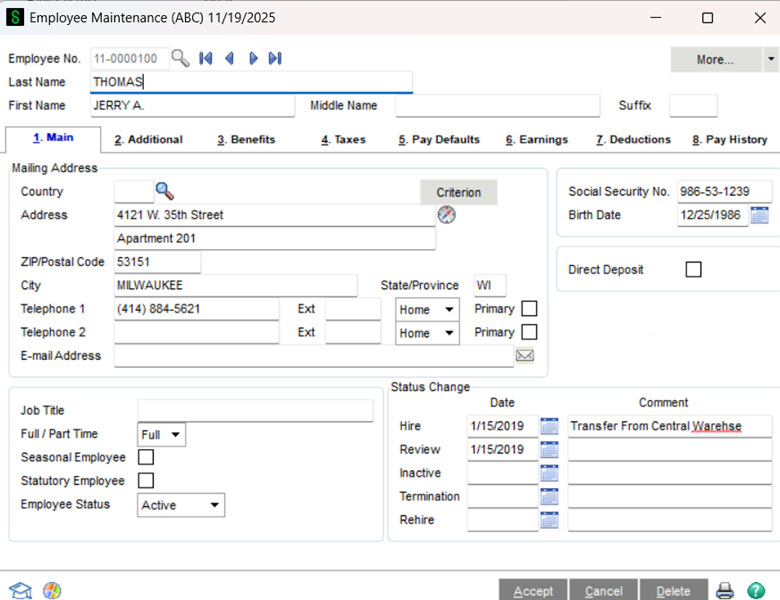
Criterion Button in Emploee Maintenance

Found in the Payroll Utilities menu, this utility allows batch updates using selectable ranges:

  • Employee Number
  • Last Name
  • Employee Sort Field

All employees matching the criteria—and already linked to Criterion—are automatically refreshed with the latest information from the Criterion portal.
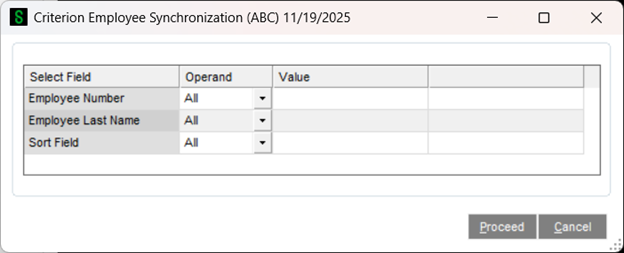
Criterion Employee Synchronization Utility

When processing payroll, Sage 100 identifies employees linked to Criterion and prompts you to synchronize them.

If changes are found, the system updates the records and offers to print a Criterion Employee Synchronization Report, similar to the Payroll Employee Audit Report, so you can easily review what changed.
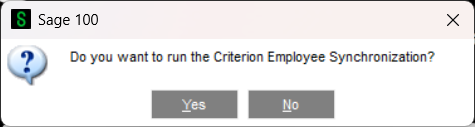

Automated Prompt During Payroll Tax Calculation

The Result: Accurate Data, Less Manual Work

This enhancement eliminates double data entry, reduces errors, and ensures your payroll team always works with the most current employee information.

Whether you’re onboarding new employees or updating existing team members, the PRCR Criterion Integration keeps your Sage 100 payroll data clean, synchronized, and reliable.

For more information on Criterion HCM, visit: criterionhcm.com

Picture of Ashley Berger

Ashley Berger

Enhancements Sales Manager

Categories:
Enhancements Sage 100
Tags:
Cloud ERPGeneral BusinessHCMPayroll

Congratulations! You’re registered to join us.

Acumatica Lunch and Learn Irvine, CA
We’re so excited to show you the power of Acumatica!

Should you have any immediate questions or needs, please feel free to reach out to your event host: ktucker@dsdinc.com