SAGE 100 MULTI-CURRENCY SERIES: Top 10 Features of DSD Multi-Currency for Sage 100
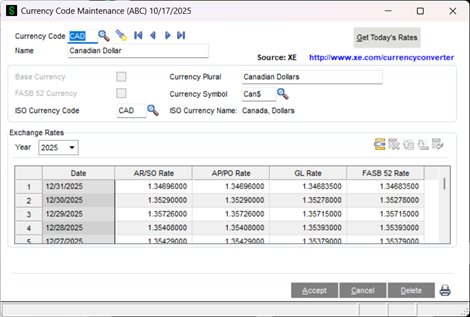 With DSD Multi-Currency, you can assign a Base (Functional) Currency by Company Code and then set up unlimited alternate Currencies to transact in. Each Currency can then have unlimited daily Exchange Rates that correspond to that Base Currency. You also have the ability to use Buy Rates (used in Accounts Receivable and Sales Order), Sell Rates (used in Accounts Payable and Purchase Order), General Ledger Rates (only used in the General Ledger module), and FASB 52 Rates. You can also enable the feature of only using one single Exchange Rate for all modules.
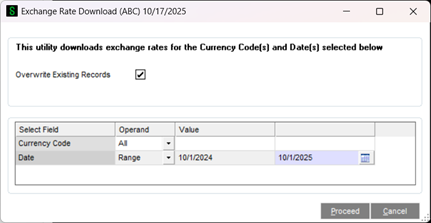 Currency Code Maintenance has a feature to auto-download the Exchange Rate for a given Currency Code by simply selecting a button on the panel, which will download the Exchange Rate for the current day from XE.COM. A utility also exists that allows for download of Exchange Rates for a Date Range for multiple Currencies at once.
With the FXMC module, you can have a Scheduled Task created that will automatically download the Exchange Rates for all of your Currencies at a specific time of day, eliminating the manual step of creating the Exchange Rates each day.
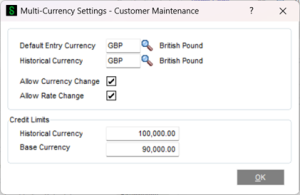 A Default Currency Code can be assigned to a Customer and Vendor, which is then automatically assigned to an Order or Invoice in data entry. The Order/Invoice Date will then be used to automatically assign the appropriate Exchange Rate from the Currency Code table.
A Historical Currency Code can also be assigned to a Customer and Vendor, which then allows for historical data to be stored in both Base Currency and Historical Currency. This is especially useful if a Customer or Vendor is invoiced in multiple Currencies.
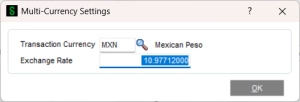 As mentioned, you can assign a Default Entry Currency Code for each Customer or Vendor, but you are not limited to that Currency on a data entry. You can change any Order/Invoice to use a different Currency than the default, and you can change the Exchange Rate that is defaulted. You have additional security to disable the changing of Transaction Currency and Entry Rate on a Customer/Vendor basis.
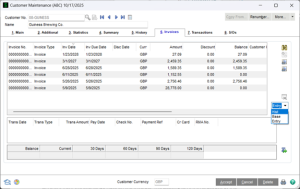 Customer Maintenance/Inquiry, Vendor Maintenance/Inquiry, and other Inquiry panels have this great feature: You can toggle the data that is displayed to present the amounts in Base Currency, Historical Currency, or Entry Currency.
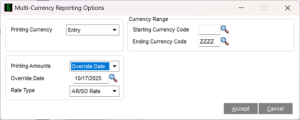 Reports in each Multi-Currency module can be run in different Currencies. Subsidiary modules can run in Base Currency, Entry Currency, Vendor/Customer Currency, or Other Currency, using As Posted Exchange Rate or Override Date/Rate. General Ledger Reports can be run in Base Currency, FASB 52 Currency, Entry Currency, or Other Currency, using As Posted Exchange Rate or Override Date/Rate. This allows users to dissect data in different ways.
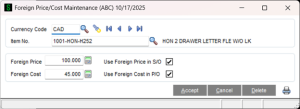 Foreign Prices and Costs can be set up by Item and Currency. Foreign Price Lists can be printed and supplied to Customers and Vendors. You can also create Price Levels/Breaks for each Foreign Price in Item Maintenance, as well as Cost Levels/Breaks in P/O Vendor Price Level Maintenance.
Gain/Loss postings to the General Ledger occur when the Exchange Rate on a payment is different from the Exchange Rate on the Invoice. The posting to AP/AR is always at the original Invoice Exchange Rate, while the posting to Cash is at the Payment Exchange Rate. The difference is posted to the Gain/Loss Account that is set up in Division Maintenance. DSD Multi-Currency automatically calculates these amounts for you during the posting process.
For US corporations that have foreign subsidiary companies, the financial reporting for the subsidiary company must be reported two ways: first, financial reporting in functional Currency (also referred to as base Currency or local Currency) to the local government, and second, financial reporting in translated US Dollars to the US government. Additionally, some General Ledger Accounts must be reported in US Dollars using the Posting Exchange Rate, while others (like Assets and Liabilities) must be reported at the Current Exchange Rate. DSD Multi-Currency handles this type of reporting, as well as calculation of Equity Adjustment on Foreign Exchange.