10 New Features in the DSD/ScanForce Multi-Bin Module for Sage 100
UOM Display in Bin Location Maintenance and Item Bin Maintenance: A new UOM Display drop box has been added to the bottom of the display List Box in Bin Location Maintenance and Item Bin Maintenance. You can select one of these options: Standard, Sales, or Purchase. All quantities displayed in the list box will be affected by this drop box setting. If the setting is “Standard”, then the quantities are presented in the List Box as stored quantities. If the setting is “Sales”, then the Item Masterfile for each item displayed will be read to get the “Sales Unit of Measure Conversion Factor” field. The quantities that are presented will be divided by the Sales Unit of Measure Conversion Factor. If the setting is “Purchase”, then the Item Masterfile for each item displayed will be read to get the “Purchase Unit of Measure Conversion Factor” field. The quantities that are presented will be divided by the Purchase Unit of Measure Conversion Factor. Each time the user changes the drop box value, the values will be redisplayed accordingly.
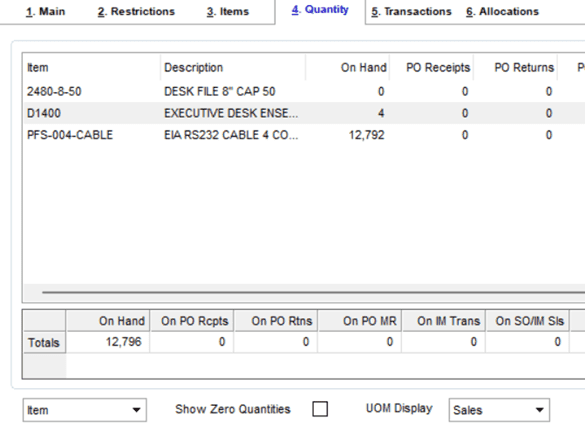
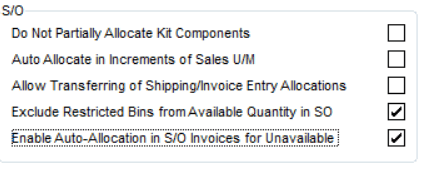
New ‘Exclude Restricted Bins from Quantity Available’ for Sales Order: A new “Exclude Restricted Bins from Available Quantity in SO” checkbox has been added to the Entry Tab in Multi-Bin Options. If this new option is enabled, the Quantity Available calculation in Sales Order Entry, S/O Invoice Entry, and S/O Shipping Entry will check all Bin Locations for that Item/Warehouse that has restrictions and will reduce the Quantity Available accordingly. A new “Restricted” column has been added to the Quantities List Box on the Main Panel in Item Maintenance/Inquiry. This new column will display the Restricted Amount described above.

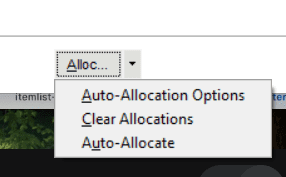
Sales Order Entry – new Auto-Allocate feature: A new Option has been added to the More button on the Sales Order Entry panel called “Auto-Allocate”. When Auto-Allocate is selected, a new popup menu will display a panel that is similar to the Clear Allocations function that will Auto-Allocate all items on the Sales Order. This is a great feature if you want to clear allocations and then re-allocate.
New Auto-Allocation method for Outbound transactions: A new Auto-Allocation method has been added to all Outbound data entries in MB Warehouse Code Maintenance, called “Closest Qty / Last Inbound Date”. For this Auto-Allocation method, primary Auto-Allocation is Closest Quantity, followed by Last Inbound Date, followed by Bin Location Order. The Closest Quantity allocation searches Bin Locations for that Item that has quantities that are closest to the Amount to Distribute.
S/O Invoice Auto-Allocation for Unavailable Quantities: A new “Enable Auto-Allocation in S/O Invoices for Unavailable Quantities” checkbox has been added to the Entry Tab in Multi-Bin Options. In S/O Invoice Data Entry, if the Auto Allocation Method for that data entry / warehouse is set to “Default Bin” or “Item Primary Picking Bin”, and the ‘Allow Negative Bin Quantities (Non-Lot/Serial)’ is enabled for that warehouse, then the auto-allocation will fully distribute to the “Default Bin” or “Item Primary Picking Bin”, even if there are insufficient quantities.
Original Reference Number added to Transaction records: A new “Original Ref Number” column has been added to the MB Transactions Tab in Bin Location Maintenance and Item Bin Maintenance. For transactions that are linked to an original order (SO, PO, RMA, PM), the ” Original Ref Number” column now displays the original order.

Production Management – New Auto-Allocation setting for Material Issues: A new Auto-Allocation Option has been added to Warehouse Bin Maintenance for P/M Material Issues, for both Auto-Allocation and L/S Auto-Allocation: Work Center. Materials on a Work Ticket are associated with a Step. Each Step is associated with a Work Center. This option will assume that the Work Center has a corresponding Bin Location with the same exact name. Auto-Allocations will use the Work Center bin and take all quantities from that Bin.

Production Management – Offset negative quantities for Lot Numbers: A new “Auto-Allocate negative Lot Number quantities in PM” checkbox has been added to the Entry Tab in Multi-Bin Options. If this new option is enabled, the Auto Issue and Backflush creation of PM Work Ticket Transaction Entries will offset negative Lot Number quantities to other lines that have positive quantities to distribute for the same Item Number. This feature is ideal for users that use Bill Option and Option Interaction to remove items based on Bill Options set in Work Ticket Entry.

Fully Allocated Date/Time fields added to Sales Order: Sales Order Entry has been enhanced to track the two new fields: FullyAllocatedDate end FullyAllocatedTime. The data entry checks the Sales Order Lines to determine if all lines are fully distributed to Bin Locations. If fully distributed, the two fields are set to the current date/time.
Bin Alloction for Serial Numbers: The Lot/Serial Bin Distribution has been enhanced to automatically assign the Bin Location when (1) the Lot/Serial Distribution Order is ‘Lot/Serial First’, and the user manually enters a Serial Number. This feature speeds up the data entry process.