Sage Intacct 2023 Release 4: Highlights, Features, and More!
November 10, 2023
by Jared Bollier, Digital Marketing Analyst
In this 2023 R4 release, Sage Intacct presents a suite of enhancements and new features designed to elevate financial management to new heights. This latest iteration promises to expand its user-friendly experience while delivering profound efficiencies across various financial processes. Whether you’re a long-time user or considering a migration to a cloud-based system, the R4 release of Sage Intacct warrants a closer look. Join us as we delve into the specifics of what this update brings to the table and how it can transform the financial operations of your business.
Notable features for this release
Advanced ownership consolidations
Sage Intacct introduces Advanced ownership consolidation, a new subscription that provides partial ownership through tiered consolidation. Unlock efficiency and elevate decision making with seamless, automatic rollup consolidation for complex partial ownership structures.
Reconciliation enhancements
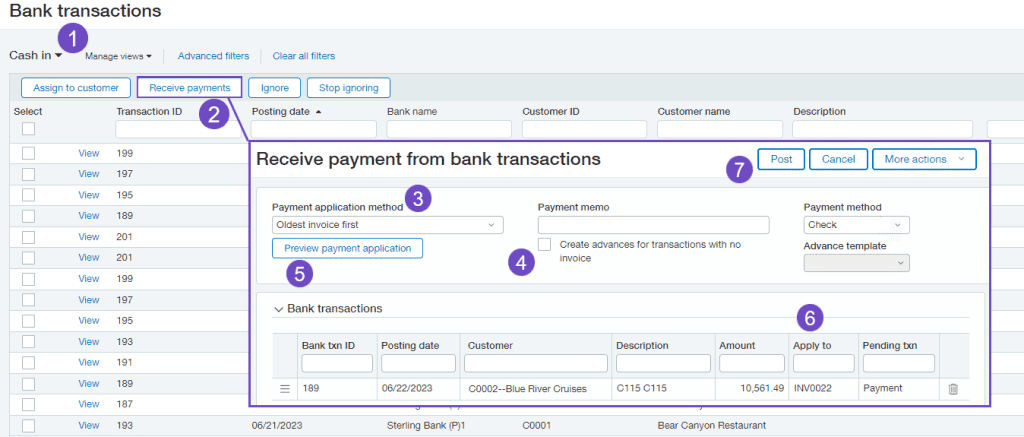
Simplify your receive payments and reconciliation process with the Bank Transaction Assistant. Receive multiple payments from bank transactions and automatically match for reconciliation. Plus, quickly pinpoint reconciliation transactions that match with match sequences.
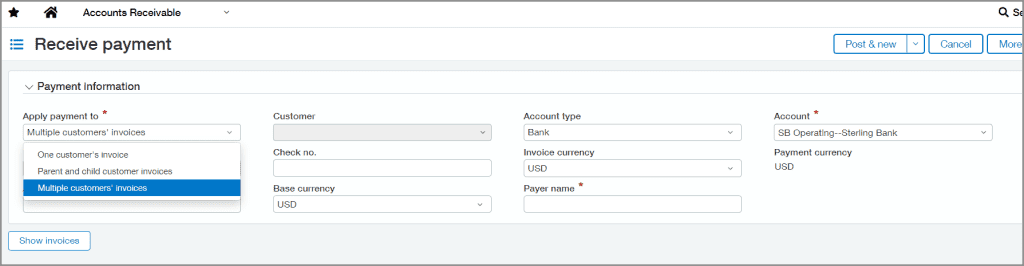
Receive one payment for multiple customers
Simplify the process of handling diverse payments. Now you can receive one payment and allocate it to different customer accounts giving you more flexibility. After this feature is set up, the option to apply payments to a single customer or multiple customer accounts appears on the Receive Payment page.
Update a bill that you submitted for approval
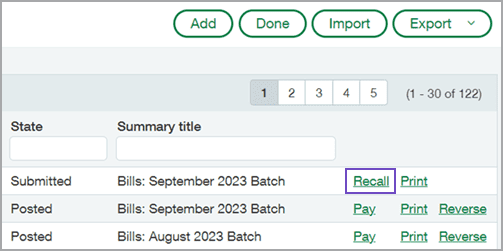
If you’ve ever selected submit on a bill, only to realize that you made an error, you’ll appreciate the new recall option for AP bill approvals.
Recall allows you to remove a submitted bill from the approval queue and return it to an editable draft state. You can then update the bill and resubmit for approval.
Industry Highlights
Contracts expense management with new list
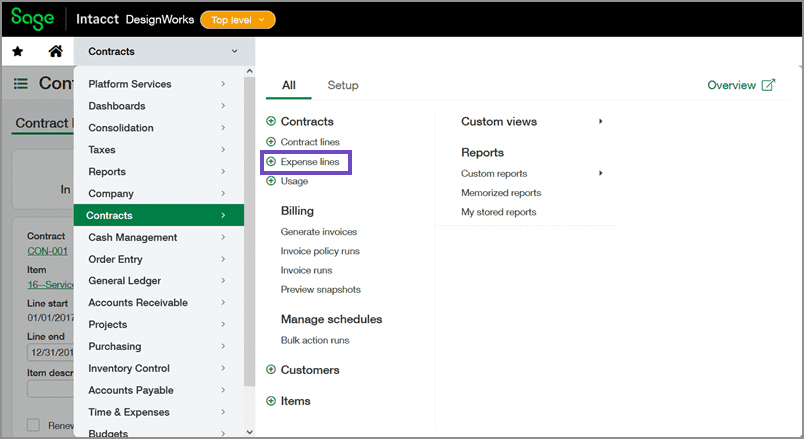
You can now use the new Expense lines list to easily manage your contract and contract line expenses. From this list, you can add new expenses, edit or view existing expenses, and import expenses.
And bonus—the Expense lines list is an enhanced list, giving you the power to use advanced filters, personalize your list view, and view list and record details side-by-side.
Project and ministry intelligence
Gain deep insights to make data-driven decisions and ensure efficiency.
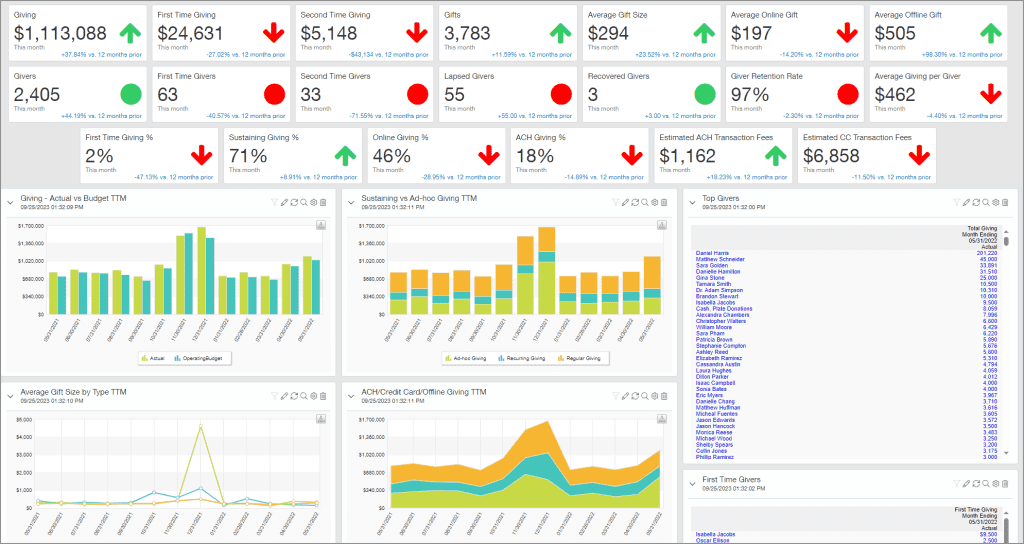
- Ministry intelligence lets you seamlessly link your accounts and business operations to improve collaboration and streamline reconciliations and audit processes.
- Project intelligence puts utilization and resource management at your fingertips, as well as comprehensive views of KPIs.
Inventory fulfillment—Generally available
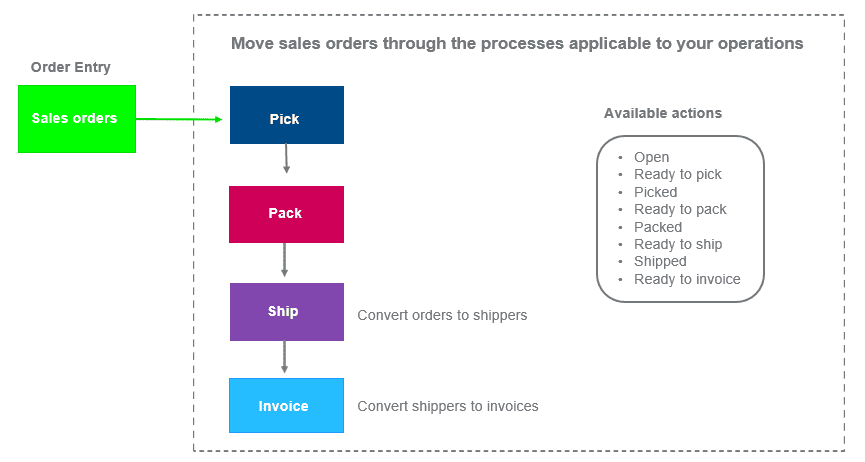
Simplify your workflow and boost efficiency with Inventory fulfillment. Track and ship sales orders promptly, ensuring your customers are delighted with quick deliveries. And, operate more efficiently and at a reduced cost with pick and pack lists.
Construction Enhancements
- Streamline your finance and operations data to win more business and execute projects efficiently. You can now manage all your project operations from one platform.
- Simplify your construction financial management with an array of features that focus on increasing efficiency and maximizing profitability.
- Output invoices in more formats for more flexibility.
- Enhance compliance when you generate and track vendor and commitment-based lien waivers.
- Easily get the insight you need with reporting and analysis
- Support businesses outside of the United States with VAT/GST on retainage
- ALL COMING SOON!
All Changes
Company and Administration
New subscription for Global Transaction Security: Build trust in your business with tools that help prevent fraudulent activity and ensure the integrity of your accounting data.
Change your Intacct language setting to French: On the Company preferences and User preferences pages, you can select the French option to set the local language for Sage Intacct.
Enhanced email delivery service is now here: We’re excited to announce the launch of our enhanced email delivery service!
Mask employee bank details: Protect employees’ sensitive banking information with the option to mask employee bank details in the audit trail.
Make a match: Alpha sequences for reconciliation matching are now available! Learn more.
Sandbox customers and partners can create, refresh, and manage sandboxes: Sage Intacct is allowing all sandbox customers and partners to create, refresh, and manage sandboxes.
New permissions: We added new permissions for Administration, Cash Management, and General Ledger.
API usage: The new API usage dashboard offers a comprehensive view for monitoring and analyzing API activity across your entire company, so you can identify issues and optimize your integrations.
Accounts Payable
Track activity: Companies with AP Automation can monitor their automated transaction volume in Subscription usage.
New Pay bills column: Review the vendor‘s preferred payment method when selecting bills to pay.
Fix mistakes on submitted bills: Retrieve a bill from the approval queue for editing using the new option to recall a bill.
Track activity: Companies with AP Automation can monitor their automated transaction volume in Subscription usage.
Vendor Aging report: Enjoy more filtering flexibility with the ability to select multiple vendors, filter by vendor group, and include child vendors.
New required field for vendors: The option to designate a vendor as an individual person is now a required field.
Vendor approval updates: Improved CSV support and a new API further enhance vendor approval.
New Pay bills column: Review the vendor‘s preferred payment method when selecting bills to pay.
Accounts Receivable
Bank transaction assistant: A new workflow to speed up and provide flexibility for Accounts Receivable and Cash Management users—Early Adopter
Single payments for multiple customers: Receive a payment and apply it to from multiple customers.
Customer Aging report: Enjoy more filtering flexibility with the ability to select multiple customers, filter by customer group, and include child customers.
Improved printed deposits: We improved the format and information included in printed deposits.
Cash Management
Bank transaction assistant: A new workflow to speed up and provide flexibility for Accounts Receivable and Cash Management users.
Match sequences: Auto-assign a sequence to matched transactions during reconciliation for insight into matching activity.
Bank transaction import experience: Save time and increase control when you import bank transactions from a centralized location—Early Adopter. Improved printed deposits: We improved the format and information included in printed deposits. South African bank files: Change which banking fields are needed to pay South African vendors. |
Consolidation
Advanced Ownership Consolidation, providing partial ownership through tiered consolidation—coming soon: Get ready for a new financial consolidation offering that supports different entity ownership percentages and multiple levels of consolidation through defined parent-subsidiary relationships.
Construction
Enhancements in Sage Field Operations: New pricing and payment options offer greater flexibility.
Contracts
New Expense lines list: Easily manage your contract and contract line expenses in the new list built in Sage Intacct’s enhanced lists framework. |
General Ledger
Change GL account numbers: You can now change your settings for the length of account numbers, as well as account numbers themselves. Control how far into the future you allow posting: If you allow transactions to be posted to future periods, you can specify how far into the future you allow posting. |
Adjustments are not allowed in locked periods: Locking a period now totally prevents changes to the period, because adjustments cannot be entered in locked periods.
Inventory Control
Announcing general availability of Fulfillment for sales order management: Last year, we announced that Fulfillment for sales order management was available for early adopters. Now, we’re pleased to announce that the feature is generally available to customers. Learn more.
Commit quantities during order entry: Last year, we announced the ability to reserve and allocate items during order entry for early adopters. We’re now pleased to announce that the feature is generally available. Learn more.
Lease Accounting
QuickStart templates support Lease Accounting: Updated QuickStart templates include the account categories and account groups you need for Lease Accounting.
Mateo
Sage Intacct Mateo supports endowment accounting! Learn about the changes made in Mateo to support endowment accounting.
Usability improvements: We’ve made several updates in Sage Intacct Mateo to make it easier to use. Learn more.
Easier to use Statements List screens: New filtering options have been added to the Statements List screens for savings and loan accounts, along with other usability improvements.
Nonprofit
Change the Intacct label for the Billable field: Change Billable and related labels so that they resonate with people in the nonprofit field. For example, Billable becomes Qualified expense. Learn more. Announcing Sage Intacct Ministry Intelligence:Ministry Intelligence seamlessly connects accounting and business operations by delivering key church management data and visibility into KPIs and insights critical to strengthening congregation health. |
Projects
Announcing Sage Intacct Project Intelligence: Project managers can effectively manage projects with deep data insights at their fingertips. Plan your projects with greater precision on revenue and expense: Capture detailed project estimates to compare estimated costs to actual costs. Say goodbye to using time-consuming workarounds and processes to manage project costs. |
Reporting - Advanced
The ICRW learning journey is an information road map for help, training videos, and Sage University classes. Whether you are new to ICRW or an expert user, the ICRW learning journey is your guide to success. |
Reporting - Financial
QuickStart templates support Lease Accounting: Updated QuickStart templates include the account categories and account groups you need for Lease Accounting.
Drill down from stored financial reports: When viewing a stored financial report, you can now drill down from the report.
Sage Construction Management
Announcing Sage Construction Management: For the first release since Sage acquired Sage Construction Management, formerly know as Corecon, we’ve made the application more intuitive and easier to use.
Taxes
1099 e-filing powered by TaxBandits: Skip the manual printing of 1099 forms and send tax information directly to TaxBandits to file with the IRS. Get ready for 1099 season: Get a head start on what you need to know for this tax season. Tax forms are available now. |
Time and Expenses
Mask employee bank details: Protect employees’ sensitive banking information with the option to mask employee bank details in the audit trail. |
User Experience
A new look for Sage Intacct: We’re debuting new colors, fonts, and a new look for links. Learn more.
Lists enhancements: Get key improvements to more easily drill down to view required data. Learn more about the enhanced list features.
Updated user interface labels: We updated labels in General Ledger and Purchasing. Learn more about label changes.
Web Services
Watch the Sage Intacct Developers portal blog to stay up-to-date on great new features in Web Services.
Industry Highlights
For all the specifics, in-depth descriptions, and demonstration videos of the improvements coming to the product, see to the complete comprehensive list of changes made in Sage Intacct 2023 Release 4.