Sage Intacct 2020 R3 Overview

August 11, 2020
by Kimberly Tucker, Director, Marketing
Sage Intacct 2020 Release 3 will make its appearance on August 22nd, continuing to help transform the way organizations work by providing features that enable users to work from anywhere and do it smarter and more efficiently than ever.
Read on to see our top features, video overviews from Sage Intacct product managers and learn all about the awesome updates and improvements coming to the cloud financial solution you know and love!
Sage Intacct 2020 R3 Top Features
Slide “back up” to Top Level from an entity tab/window instance
Time-out reminder notifications
New credit card reconciliation tool with credit card feeds
1099-NEC form classification now available for early 2020 tax filing preparation with applicable Vendors
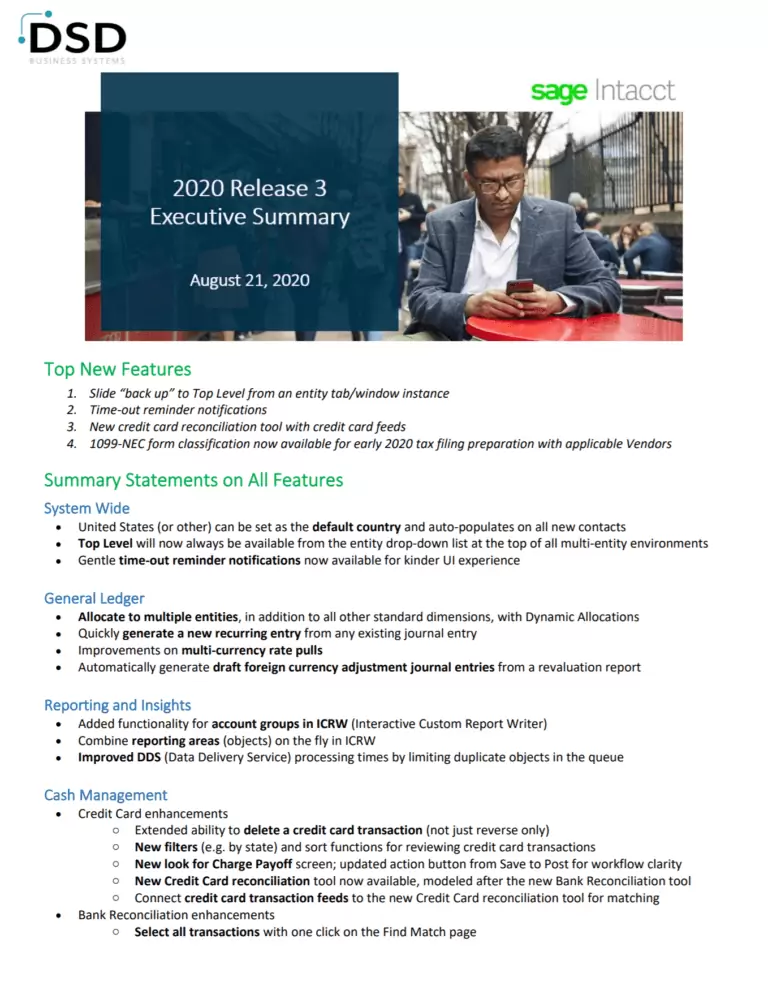
Sage Intacct 2020 R3 Review
Sage Intacct 2020 R3 Spotlights




Sage Intacct 2020 R3 By Module
Accounts Payable
When a user enters a credit for a payment, the Amount to pay automatically updates, eliminating the need to calculate this value manually.
Users no longer have to wait to complete the payment flow on a partial payment in order to pay off the balance of a partially paid bill.
Accounts Receivable
Two new checkboxes on the Configure AR page give users better control over printed and emailed transactions
Now ARPAYMENT is the only AR payment object users see in the catalog when an admin sets up customizations like Smart Events and create custom reports.
The addition of new ARPAYMENT fields and changes to existing fields give users more options when creating reports in Custom Report Writer.
Create Smart Rules to customize AR payments when subscribed to Customization or Platform Services.
Cash Management
Soon there will be a new and improved credit card reconciliation process in Cash Management that’s designed to handle large volumes of transactions with ease.
Automate your credit card reconciliation process by connecting your credit card accounts to bank feeds.
Sage Intacct now supports bank file payments between co-located banks in South Africa.
2020 R3 is delivering a few key enhancements.
- Delete a credit card transaction.
- View credit card transactions by state.
- New look for charge payoffs.
- Filter and sort for credit card transactions.
- Charge payoffs Save button renamed to Post for workflow clarity.
- Select all transactions with one click on the Find Match page.
- Description field on the Reconcile Bank Account page is re-sized for readability.
- Transaction lists load more quickly now that we have limited the number of transaction to 100 rows per page.
- Filter and sort the Bank Transactions list page by Account type.
- Secondary reconciliation actions change from buttons to links.
General Ledger
If your company is subscribed to Dynamic Allocations, you can now allocate costs across several different entities in each entities’ own base currency.
Use dynamic allocations across entities to:
- Automatically shift or split dynamically calculated amounts in a repeatable, automated process.
- Include line items in a single transaction with different base currencies derived from the base currency for the line item’s associated entity
When you use an existing journal entry to create a new recurring entry, the basic information gets prepopulated from the selected journal entry.
Transactions using the Intacct daily rate (or an Oanda rate) with a date prior to 1990 are blocked, due to exchange rates before 1990 being unavailable in Oanda.
This includes all General Ledger transactions, such as GAAP, tax, statistical accounts.
The Recurring Journal Entry page now separates the entry details from the recurring schedule on Entry and Schedule tabs
When users set up the GL through the UI or with a CSV file, the value for Budget balance sheet accounts by is now For period. End of period is no longer used.
Additionally, if you enter budget figures for balance sheet accounts directly or using a CSV upload, you now enter the amount budgeted for each period rather than ending cumulative balances for each period.
Administration and Company
Now, when your company or entity has ISO country codes enabled, the country field auto populates with the default country whenever you enter an address.
Users can now set how many hours past midnight you want scheduled jobs to begin to avoid conflict with other scheduled processes.
Budgeting and Planning
- Increased visibility to your GL accounts
- Improved budget line location awareness across the Budgeting and Planning application
- Get started working with models more quickly by importing model lines from MS Excel
- Fixed assumptions now appear when you create a Model report, in addition to existing model lines
- Budgeting and Planning now supports all reporting books in addition to Cash, Accrual, and Global Consolidation books
See the Sage Intacct Budgeting and Planning release note for more information.
Sage Intacct Budgeting and Planning is an add-on application that offers a collaborative environment for creating and managing budgets.
Talk to your account manager for more information.
Consolidation
2020 R3 is expanding the support for entity level GL accounts to those companies that use Global Consolidations or multiple base currencies
Multi-entity
If you inadvertently close your top level tab, you don’t need to sign in again. You can now select your top level from the entity picker
Contracts
If the reporting period is open, you can clear individual MEA allocations one at a time to get to the point where the correction is needed.
Now you can drill down into the contract line data directly from a contract’s line grid.
If your company has this option enabled, you can now delete a contract invoice that has a negative line if you haven’t applied a credit to the invoice.
The renewal process now pulls contact data from the customer record
Editing contract schedules now requires the Edit permission
Updates to the MEA allocation report object and list user interface help you better manage contracts with multiple MEA allocations
Order Entry
We enhanced the audit trail for recurring transaction templates so you can confirm when they were turned off or on that the changes are correct
Use the new support for custom fields in the CSV import file and skip the extra work of entering the information for these fields in the user interface
Previously, printed or emailed draft transactions were always flagged as printed, which could make editing the transactions difficult. You can use a new configuration option to decide how to treat draft transactions that you print.
If you use multiple currencies, the purchase transactions that are automatically generated for a drop-ship or buy-to-order sales transaction are now always in the vendor currency, if it is set.
AND SO MUCH MORE!
See the comprehensive list of changes made in Sage Intacct 2020 Release 3 for all the details and in-depth descriptions of the changes coming to the product.