...

How to Reverse Posted Journals Using the Journal Reversal Tool

How To Reverse Posted Journals Using The Journal Reversal Tool

Have you ever had a journal post to the wrong date or to the wrong GL accounts? At some point, reversals will ensue, and usually must be done manually. Sage has seen and heard userโ€™s woes, and has incorporated a new tool that will help make those reversals that much easier! Starting in Sage 100 version 2015, there is a tool in Account Maintenance that enables users to reverse said journals, with the click of a single button. Letโ€™s review how this new feature works.

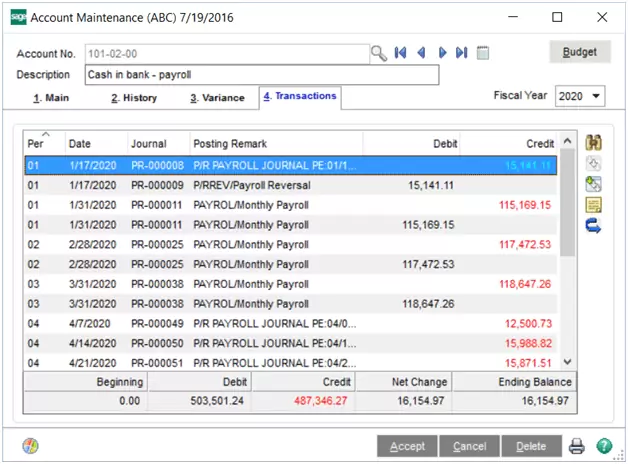
To start, go to the General Ledger moduleโ€”Main folderโ€”Account Maintenance.

Choose the account number for which a reversal is needed. Now proceed to the Transactions tab.

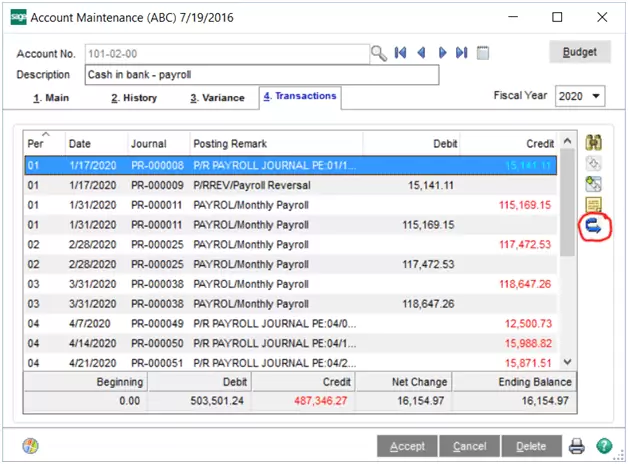
Next, select the transaction to reverse. If needed, users can press the Journal Zoom button on the right-hand side to review the transaction detail. Otherwise, press the Journal Reversal button.

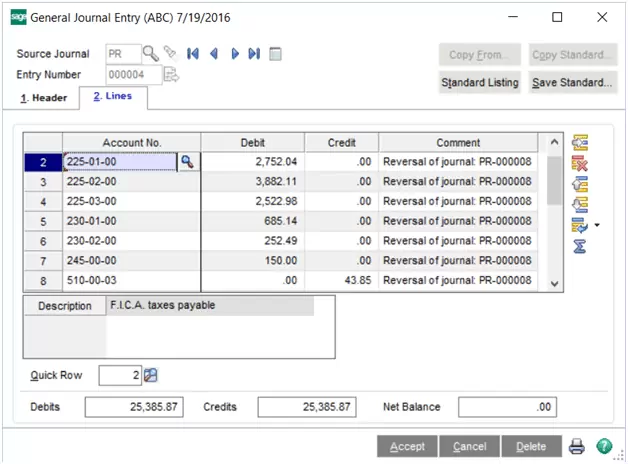
When pressed, the system will take all the entries that up the transaction and create a reversal entry in General Journal Entry. The following message will also appear:

The General Journal Entry will sit unposted, awaiting users to review.

Once ready, users will simply run the General Journal to post the reversal entries.

Not only is this a great time-saving tool, but it also ensures accuracy and eliminates the worry of possible mis-keyed entries! Give this feature a try when you can! For more tips and tricks for Sage 100, visit us at www.dsdinc.com.

Cindy Strong


Written by Cindy Whitlock
, ERP Consultant at DSD Business Systems

Category:
DSD Business Systems
Tag:
General Business

Congratulations! Youโ€™re registered to join us.

Acumatica Lunch and Learn Irvine, CA
Weโ€™re so excited to show you the power of Acumatica!

Should you have any immediate questions or needs, please feel free to reach out to your event host: ktucker@dsdinc.com