Criterion 20 R5: New Updates to Reports, Timesheets, ESS, and More!

October 6, 2020

Criterion 20 R5 is now available!
Criterion 20 R5 is here! See an overview of the updates below and join us for the official overview webinar on Friday, October 16th!
CRITERION 20 R5 OVERVIEW
FRIDAY, OCTOBER 16TH
9:00a PST / 12:00p EST
What's new in Criterion 20 R5?
Reports
NEW REPORT: PPP – Loan Forgiveness Payroll Cost
The new report – PPP – Loan Forgiveness Payroll Cost – is now available at Payroll>Reports>Payroll. The report compiles the total payroll cost and deduction information necessary for CARES Act Loan Forgiveness program.
LCP Report in Excel Format
LCP report is now available in EXCEL format and contains more columns for:
- Project Code
- The sum of total gross pay for the employee during the week
- Position
- SSN is shown in full now
941 Report: 2020 Updates
The 941 report template is updated for 2, 3 and 4 quarters of 2020.
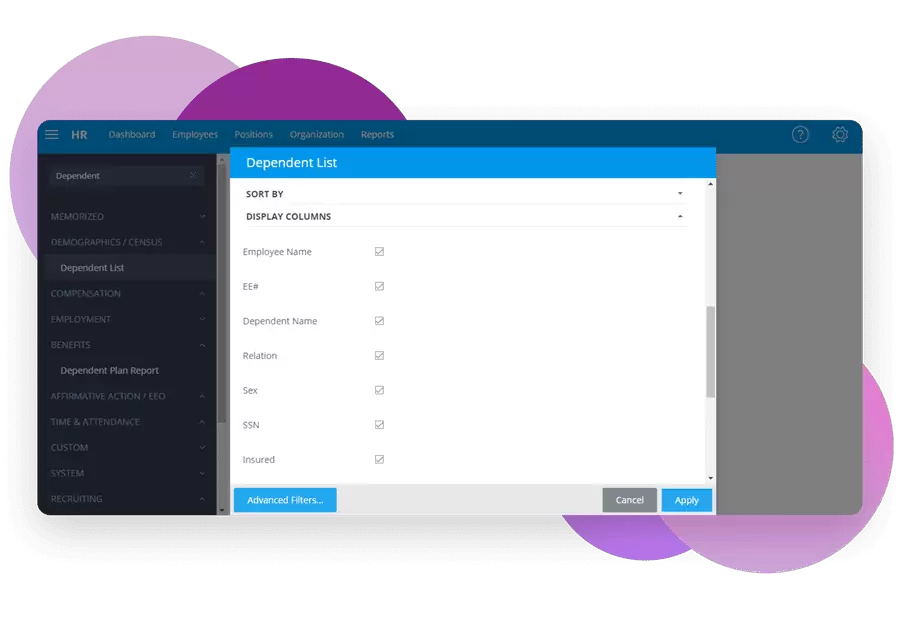
Allow Hiding/Showing Report Columns
For the following reports, Criterion has implemented the feature that allows hiding/showing report columns.
1. Dependent List
2. Employee Bank Account Info
3. Employee Tax Configuration
4. Name List (as of)
5. New Hires
6. Promotions/Transfers
7. Salary (as of)
8. Taxable Wages Total
9. Termination List
You simply select the columns at the report settings to show them in the report.
Timesheet Export Report: Export Full Details Option Added
The standard Timesheet Export Report now has the option that allows exporting full details.
The “Export Full Details” option is now available and if enabled, the additional “Start Time” and “End Time” columns are visible and show data if it exists in the timesheet.
WH-347 Report Updated
Criterion updated the WH-347 report and improved the layout.
New Report: Workers Compensation
Another new report shows payroll information for employees that have Workers Compensation assigned to their primary or additional position.
Timesheets
Code/Description Visibility and Searching in Fields by Code/Description
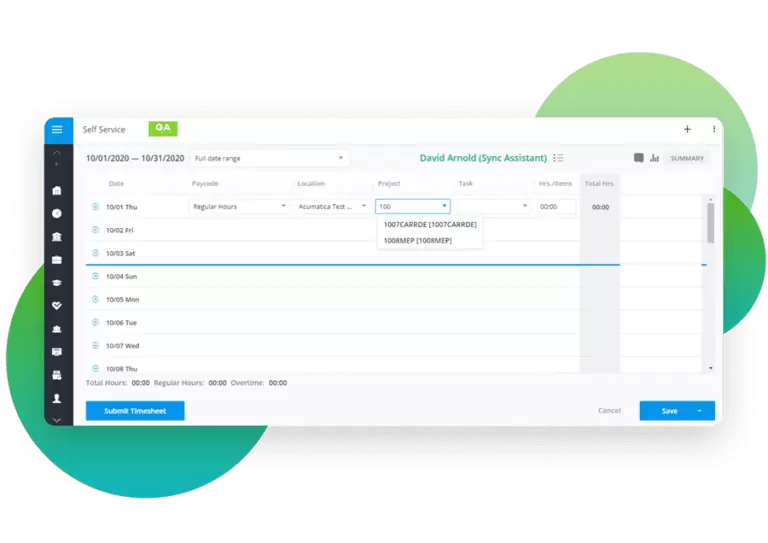
My Timesheet, Team Timesheets and Payroll Entry Employee Details now allow searching for a necessary value by code or description in the Work Location, Area, Task and Project fields.
When importing team timesheets, the fields Work location, Work Area, project and Task now require the values in the format: CODE (Description)
Viewing Geolocations on Map
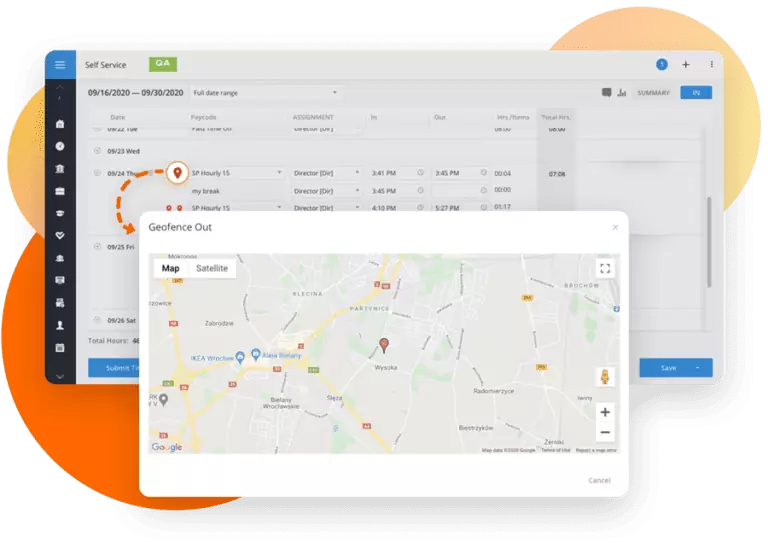
Now for time punches made outside the defined geofence, Criterion visually shows the locations on a map.
In Timesheets, you can click the “Outside the geofence” geolocation mark to open a map in the pop-up window.
Allow Mass Deleting Unsubmitted Time Off Requests from Timesheet
Criterion now allows deleting unsubmitted Time Off requests from the timesheet.
If checkbox “Auto Timeoff Approval” is turned off and the timesheet contains unsubmitted Time Off requests:
- When submitting the timesheet, the dialogue box appears where you can approve deleting unsubmitted Time Off requests that exist on the timesheets attempting to be submitted.
- If approved, the unsubmitted Time Off requests are deleted from the timesheet and the timesheets are submitted.
- If not approved, the timesheets are not submitted.
Tokens for Timesheet Alerts
The following tokens are added for the Work Hours Limit Alert (day/week limit) email layouts:
- @dailyHours
- @dailyLimit
- @weeklyHours
- @weeklyLimit
Team Timesheets
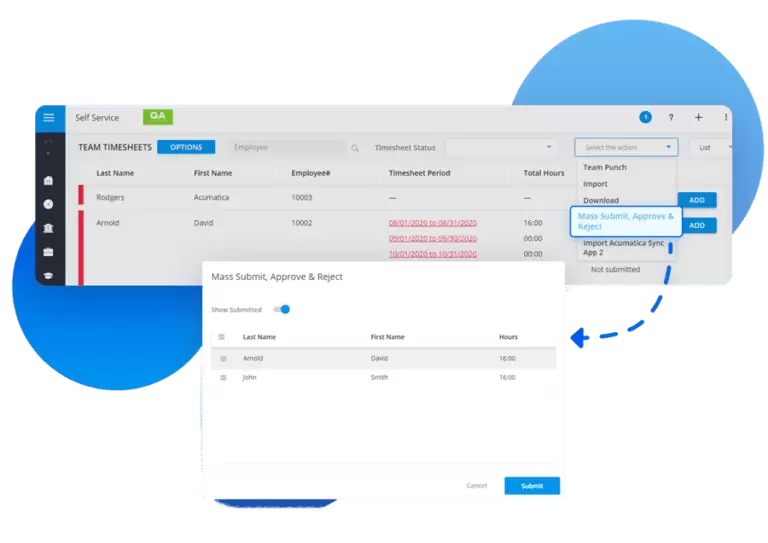
Mass Approving of Timesheets
In Team Timesheets, Criterion has added the action that allows bulk approving of timesheets submitted for approval. This means you do not need to approve timesheets one by one anymore.
Sorting By Status
Within Team Timesheets, Criterion now provides a user with the ability to sort their team’s timesheets by the status they currently set to.
Statuses include: Not Submitted, Submitted, Approved & Rejected.
This allows the user a greater ability to focus on the remaining timesheets that need approval/submission come end of pay period.
Payroll
Criterion UK Payroll Support
This release, Criterion is proud to unveil their expansion into the United Kingdom (UK) payroll. They are anticipating to be certified by HMRC shortly.
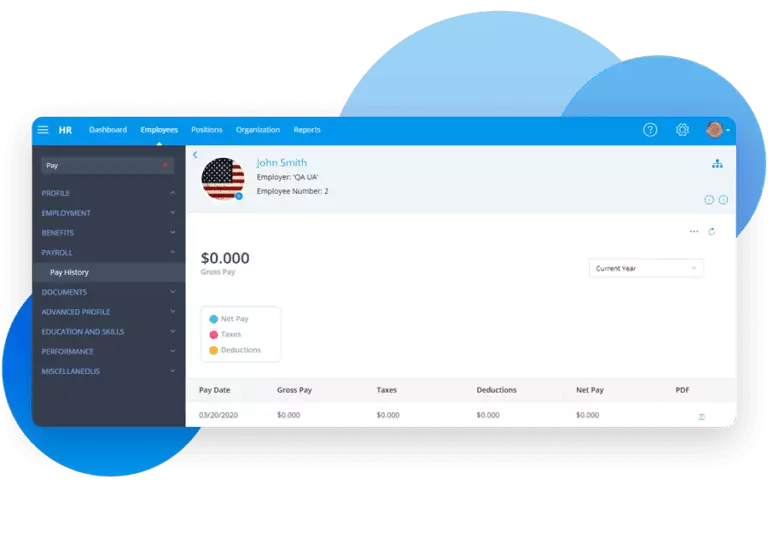
Employee Pay History Available
The Employee Pay History information is available for Admin users to view under the Employee profile of the HR module and in the Payroll module.
Payroll Summary by Employee Report: Filtering And Sorting Improved
Criterion has implemented the feature that allows a user to filter the reporting data of the Payroll Summary by Employee report by a batch or a number of batches. You also now can sort the codes under Taxes and Deductions by type. Incomes with zero hours and zero amounts will not show in the reporting anymore.
Payroll Reports: Sorting Options Added
For the Paycheck By Employee report, Criterion has added the sorting options that allow sorting the data by Employee Last Name, Employee ID, Work Location, and Department. For the Pay Date Summary report, Criterion has added the sorting options that allow sorting the data by Work Location, Cost Center, Division, and Section, and Department.
Task Scheduler
Support for Data Grid Reports
Criterion has extended the Task Scheduler’s functionality to send reports t include saved Data Grid reports.
That means now you can create a task to send out Data Grid reports at a selected frequency.

ESS Recruiting
Candidate Details Extended to Hiring Managers
Under ESS > Recruiting > Job Postings > Candidate Details, we now show the candidate’s Demographics information and Employment Application Form.

ACH with Kotapay
ACH file transmission to Kotapay
In this release, Criterion has implemented the ACH file transmission to Kotapay.
The new ACH Processing option – Kotapay – is available in Payroll Settings. If the Kotapay option is enabled for an employer, a user can directly transmit the file by clicking “Generate ACH”.
In the Tax Filing & Payments screen, for the ACH type rows, an icon that launches the Kotapay website in a new tab is available.
Faster processing options are available under the Kotapay method od ACH.
Certified Rates
Prevailing Wage Calculation Support
The new flag – Prevailing Wage Calculation – is added to HR > Settings > Certified Rates.
By default, it is on. If this option is enabled, certified deduction types are not displayed in payroll.
Instead, deduction values are adjusted to the Fringe Income* (Fringe Income in payroll = Fringe Income – Fringe Deduction) or to the winning rate** (if Fringe Income doesn’t exist in the Certified Rate table).
Terms:
*Fringe incomes are those included on a certified rate table.
**Winning rate is the rate determined by the following calculation:
Employee position rate > or < Certified rate table BASE + (Certified rate table income – sum of certified deduction types)

Tokens
Email Layouts: More Tokens Added
Criterion has added the following tokens to email layouts:
- The @Job token is added to the Recruiter Notification email layout that allows to easily identify which open vacancy a candidate applied against.
- The tokens for Interview Type, Interview Address, and Interview duration are added for the Candidate Interview Invitation email layout.

Benefit Tokens Added
Criterion implemented new Expression Builder Tokens that allow you to reference the value of one benefit plan premium/coverage/contribution in the formula of another plan.
Additional Updates
Holiday Details: Ability to Prohibit Payment
Criterion added a toggle within Holiday settings to allow prohibiting payment of a holiday should the employee not work the day prior and after the holiday.
Data Field Auto-Formatting
To speed up the data entry process, Criterion has implemented the automatic formatting of a date field from mmddyyyy into mm/dd/yyyy.
New Document Routing Feature
This feature allows Forms/Documents to be placed in a designated folder, to reduce the administration time of document allocation/organization.
In System Configuration –> Code Tables –> User Code Tables –> Document Type, you can specify the code of the folder that documents that have this type, should be sent to upon completion. The folder codes can be found in; System Configuration –> Code Tables –> User Code Tables –> Document Location Type.
Time Off Details: Allow Override Hours Per Day
Now Criterion allows overriding Hours Per Day for Time Off.
At the Time Off Details screen in Settings > HR Administration you can find the Override Hours Per Day toggle. Once enabled, it allows an employee to request more than the average hours that are listed in the Hours Per Day field.
Text Editor: Setting Up Default Font And Font Size
Now you can specify a font and a font size that will be used by default in the text editor. You can find the new settings – HTML Editor Default Font and HTML Editor Default Font Size – in the Miscellaneous section of the Employer Settings.
GL Account Mapping: Exporting
The new button – Export – is added to GL Account Map page. It allows exporting GL accounts in the same format that is used for 5D – Payroll GL import template.
App Store
In this release, Criterion has improved the Criterion App and redesigned the Login Page. The scanning button is renamed to “Sign in with Touch ID” or “Sign in with Face ID” depending on the phone model.